De thermostaat heeft 4 instellingen waarmee bepaald wordt of er verwarmd of gekoeld wordt. Dit wordt geregeld met parameter 7 NoD. De opties zijn:
* Handmatig verwarmen (Hot)
* Handmatig koelen (CLd)
* Automatisch omschakelen tussen verwarmen en koelen (Aut)
* Handmatig omschakelen vanaf het beginscherm (rEu = reversible).
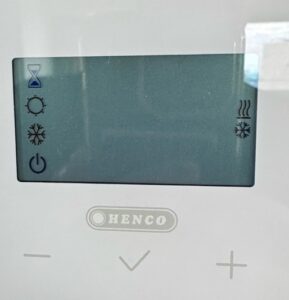
Het is het handigst en veiligst om deze parameter op rEu te zetten. Je kunt dan op het ‘reversible mode’ scherm instellen of je wilt verwarmen, koelen of de automatische modus gebruiken. Doe dat laatste (Aut) nooit tussen 1 oktober en 1 april als er geen koeling beschikbaar is. Dat kan problemen geven. Het is het veiligst om altijd zelf handmatig te kiezen voor of verwarmen of koelen.
- Druk net zolang op de middelste (V) toets tot het instellingen scherm verschijnt.
- Druk een aantal keren op de rechter + toets tot het scherm NoD en 7 weergeeft.
- Druk 1x op de middelste toets (V).
- Wordt een andere waarde dan rEu weergegeven? Druk op de + tot je rEu ziet en druk dan 1x op de middelste toets (V) om te bevestigen.
- Druk op de + toets tot je bij End komt en druk dan 1x op de middelste toets (V).
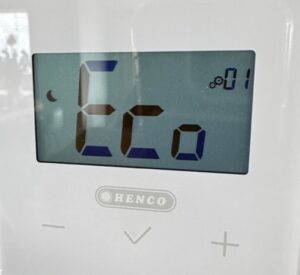
De thermostaat geeft nu de temperatuur weer.
- Druk weer op de middelste toets (V) tot je het ‘reversible mode’ scherm ziet
- Druk op de + toets tot de verwarming en koelen symbolen aan de rechterkant knipperen.
- Druk op de middelste toets (V). Druk op de + toets tot je CLd ziet en bevestig door nog een keer op de middelste toets (V) te drukken.
Als het goed is is de led in de Henco box bij de vloerverwarmingsverdeler nu blauw geworden. En worden na een paar minuten ook de klepjes onder de afleverset open gestuurd en gaat de koeling werken. Als je dat nog niet eerder gedaan hebt is het verstandig om nog een aantal andere zaken te checken. Ga daarvoor naar controleer de thermostaatkranen. Heb je deze stap al uitgevoerd. Dan stopt hier de troubleshooting gids.
The thermostat has 4 settings that determine whether heating or cooling is active.. This is controlled by parameter 7 NoD. The options are:
- Manual heating (Hot)
- Manual cooling (CLd)
- Automatic switching between heating and cooling (Aut)
- Manual switching from the home screen (rEu = reversible)
It is most convenient and safest to set this parameter to rEu. You can then select on the reversible mode screen whether you want to heat, cool, or use automatic mode. Never use the latter (Aut) between October 1 and April 1 when cooling is not available. This can cause problems. It is safest to always manually select either heating or cooling yourself.
- Press and hold the middle button (V) until the settings screen appears.
- Press the right + button several times until the screen displays NoD and 7.
- Press the middle button (V) once.
- Is a value other than rEu displayed? Press the + until you see rEu and then press the middle button (V) once to confirm.
- Press the + button until you reach End and then press the middle button (V) once.
The thermostat now displays the temperature.
- Press the middle button (V) again until you see the reversible mode screen.
- Press the + button until the heating and cooling symbols on the right side flash.
- Press the middle button (V). Press the + button until you see CLd and confirm by pressing the middle button (V) one more time.
The LED in the Henco box at the underfloor heating manifold should now have turned blue. And after a few minutes, the valves under the delivery unit are should open and the cooling starts working. If you haven’t done so earlier please verify that there are no other issues and visit check the thermostatic valves, If you already checked those, then this is the end of the troubleshooting guide.