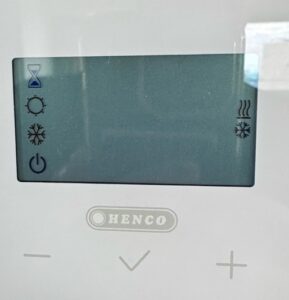
De bediening van de thermostaat is helaas niet erg gebruikersvriendelijk. Mocht je er bij deze en volgende stappen niet uitkomen vraag dan de service manager of een andere bewoner om hulp.
Op de thermostaat in de woonkamer: Druk net zolang op de middelste toets (V) tot het scherm zoals op de foto verschijnt (soms zijn de zandloper en de twee symbolen rechts niet zichtbaar). Om welk symbool knippert er een blokje?
- Aan/uit symbool → de thermostaat staat uit. Druk op de plus toets tot het blokje knippert om het zonnetje
- Sneeuwvlokje (aan de linkerkant) → de thermostaat staat op vorstbescherming. Druk op de plustoets tot het blokje knippert om het zonnetje
Controleer vervolgens de instelling van parameter 20
Unfortunately, the thermostat controls are not very user‑friendly. If you get stuck during this or the following steps, ask the service manager or another resident for help.
On the wall-mounted thermostat in the living room: Press and hold the middle key (V) until the screen shown here appears (sometimes the hourglass and the two symbols on the right are not visible). Around which symbol does a block blink?
- On/off symbol → the thermostat is off. Press the plus button until the block flashes around the sun symbol
- Snowflake (on the left) → the thermostat is set to frost protection. Press the plus button until the block flashes around the sun symbol
Next check the setting of parameter 20