ENGLISH BELOW
De mechanische ventilatie in de appartementen is uitgerust met warmteterugwinning (WTW). In de winter wordt warme lucht uit het appartement gezogen. Deze warme lucht gaat door een warmtewisselaar in de WTW-unit. Daarmee wordt koude buitenlucht die het appartement ingeblazen wordt opgewarmd. Op die manier verlies je weinig warmte door het ventileren.
In de zomer werkt het precies omgekeerd. Relatief koele lucht wordt uit het appartement gezogen. Deze lucht koelt in de warmtewisselaar de warme lucht die van buiten komt af. Zo wordt ervoor gezorgd dat het appartement niet opwarmt door het ventileren.
Er is echter een situatie waarin je de warmtewisselaar in de WTW niet wilt gebruiken. En dat is als het binnen ’te warm’ is en de buitenlucht kouder is dan de temperatuur binnen. In dat geval wil je de koelere buitenlucht direct het appartement inblazen en niet eerst opwarmen in de WTW. Het is immers al te warm. Voor deze situatie heeft de WTW-unit een zogenaamde bypass-klep. Deze zorgt ervoor dat de koelere buitenlucht om de warmtewisselaar heen geleid wordt.
Daarnaast heeft de WTW ook nog de optie om als de bypass-klep geopend is harder te gaan ventileren. Dat heet de bypass boost functie. Het gebruik van de bypass boost functie helpt dus om het appartement sneller af te koelen als het te warm is. Dit helpt, naast de vloerkoeling, om de temperatuur te beheersen.
De bypass boost functie staat niet standaard aan op het besturingskastje van de WTW. Volg de hierna beschreven stappen om de functie in te schakelen:
- Maak de bediening ‘wakker’ door 1x op de knop linksonder te drukken.
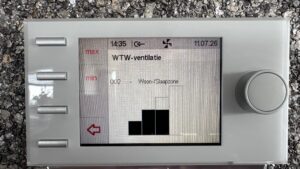
- Als het onderstaande scherm in beeld is, druk dan 1x op de rechterknop
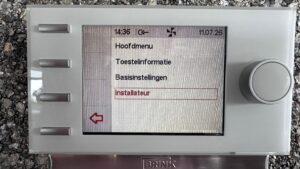
- Draai aan de rechterknop tot de optie ‘installateur’ rood oplicht. Druk vervolgens 1x op de rechterknop
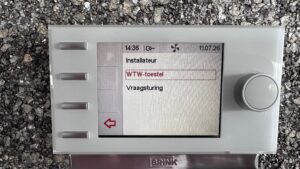
- Draai, indien nodig, aan de rechterknop tot de optie WTW-toestel rood oplicht. Druk vervolgens 1x op de rechterknop
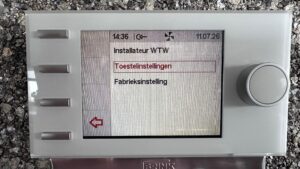
- Draai, indien nodig, aan de rechterknop tot de optie Toestelinstellingen rood oplicht. Druk vervolgens 1x op de rechterknop
- Wacht op het volgende scherm tot de instellingen zijn opgehaald uit de WTW en ga dan naar de volgende stap.
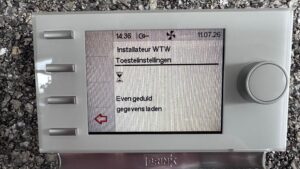
- Scroll door aan de rechterknop te draaien tot de optie Werking bypass klep rood oplicht.Voor deze en alle volgende stappen geldt: door vanuit het menu op de rechterknop te drukken kom je bij de instelling. Je kunt die dan wijzigen door aan de knop te draaien. Door er weer op te drukken kom je terug in het menu en is de instelling aangepast.Controleer of de waarde op Auto staat. Zo niet, pas dit dan aan.
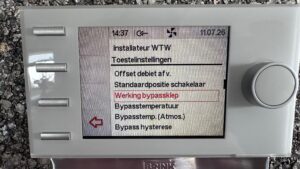
- Scroll naar ‘bypasstemperatuur’. Dit is de temperatuurinstelling die gebruikt wordt om de bypass klep te openen. De WTW meet de temperatuur van de afgevoerde lucht uit het appartement. Houdt er rekening mee dat die altijd 1-1,5 graad hoger is dan de temperatuur die je op de kamerthermostaat ziet. De standaardwaarde is 24 graden. Je kunt hem desnoods een halve graad lager zetten, maar zet hem niet te laag. Ander zul je merken dat de bypass functie actief blijft terwijl het niet meer nodig is.
- Pas de instelling Bypass temp (Atmos.) niet aan.
- Pas de waarde van Bypass hysterese aan naar 0,5
- Zet de instelling Bypass boost op Aan
- Bij de instelling Bypass boost preset kun je instellen hoe hard de WTW moet gaan ventileren als de bypass open staat. De standaard waarde is 3 (maximaal ventileren). Als je vindt dat dat te veel herrie is kun je de instelling ook op 2 zetten. Is dat nog te veel herrie? Zet dan de bypass boost weer uit :). Dan is deze functie niet voor jou.
- Druk een aantal keren op het knopje links onder om weer terug te keren naar het beginscherm.
ENGLISH
The mechanical ventilation in the apartments is equipped with heat recovery (HRV). In winter, warm air is extracted from the apartment. This warm air passes through a heat exchanger inside the HRV unit. The heat from the extracted air is used to warm up the cold outside air that is blown into the apartment. This way, you lose very little heat while ventilating.
In summer, the system works the other way around. Relatively cool indoor air is extracted. In the heat exchanger, this cooler air helps cool down the warm outside air before it enters the apartment. This prevents the apartment from heating up due to ventilation.
However, there is one situation where you don’t want to use the heat exchanger. That is when the apartment is too warm, and the outside air is cooler than the indoor temperature. In that case, you want the cooler outside air to enter the apartment directly, without being warmed up in the HRV. To handle this, the HRV unit has a bypass valve. This valve directs the cooler outside air around the heat exchanger.
In addition, the HRV has an option to increase the ventilation rate when the bypass valve is open. This is called the bypass boost function. Using the bypass boost helps cool down the apartment more quickly when it is too warm. Together with the floor cooling system, it helps keep the indoor temperature under control.
De bypass boost function is not turned on by default on the controller of the HRV. Follow the steps hereafter to turn the function on:
- Wake up the controller by pressing once on the bottom left button
- Once this screen is visible push the push-and-turn-knob on the right once
- Turn the push-and-turn-knob on the right until the option Installer (of Installateur) lights up in red. Then push the push-and-turn-knob on the right once.
- Turn, if necessary the push-and-turn-knob on the right, until the option HRU-appliance lights up in red. Then push the push-and-turn-knob on the right once
- Turn, if necessary the push-and-turn-knob on the right, until the option Device settings (or toestelinstellingen) lights up in red. Then push the push-and-turn-knob on the right once
- Wait on the next screen until the settings have been retrieved from the HRU-appliance. Then continue with the next step.
- Scroll by turning the push-and-turn-knob on the right until the option Operation bypass valve (Werking bypass klep) lights up in redFor this and all next steps: from the menu you enter the setting of the parameter by pushing the push-and-turn-knob on the right. You change the setting by turning the push-and-turn-knob. By pushing the push-and-turn-knob again you store the setting and return to the menu.Check if the value is set to Auto. If not change it to that value.
-
Scroll to “bypass temperature.” This is the temperature setting used to open the bypass valve. The HRV measures the temperature of the extracted air from the apartment. Keep in mind that this temperature is always about 1–1.5°C higher than the temperature shown on your room thermostat.
The default value is 24°C. You can lower it by half a degree if needed, but do not set it too low. Otherwise, you will notice that the bypass function stays active even when it is no longer necessary.
- Do not change the value of Bypass temp (Atmos.)
- Set the value of Bypass hysteresis to 0,5
- Set the value of Bypass boost op On (Aan)
- Under “Bypass boost preset” you can set how strongly the HRV should ventilate when the bypass is open. The default value is 3 (maximum ventilation). If you feel that this creates too much noise, you can set it to 2 instead.If that still makes too much noise, simply turn the bypass boost off. In that case, this function is not for you.
- Push the button on the bottom left a few times until you’re back on the main screen.